Klaviyo
Klaviyo event data: the reOtter trigger payload reference
Every property on the custom metric events reOtter fires into Klaviyo — the envelope, product card shape, and the flow patterns agencies build with them.
August 19, 2026
reOtter fires custom metric events into Klaviyo per customer at the right moment — reorder due, at risk, winback, subscription offer, cross-sell. Events trigger flows and carry a rich payload about that specific moment.
For campaigns — and flows reOtter doesn't trigger — reOtter also maintains nightly-refreshed profile properties: see Klaviyo profile properties. Rule of thumb: flows read the event, campaigns read the profile.
Metrics
Each enabled trigger fires as a Klaviyo custom metric your flow listens for:
| Trigger | Klaviyo metric |
|---|---|
| Reorder Reminder | reOtter - Reorder Reminder |
| At Risk | reOtter - At Risk |
| Winback | reOtter - Winback |
| Subscription Offer | reOtter - Subscription Offer |
| Cross-Sell Offer | reOtter - Cross-Sell Offer |
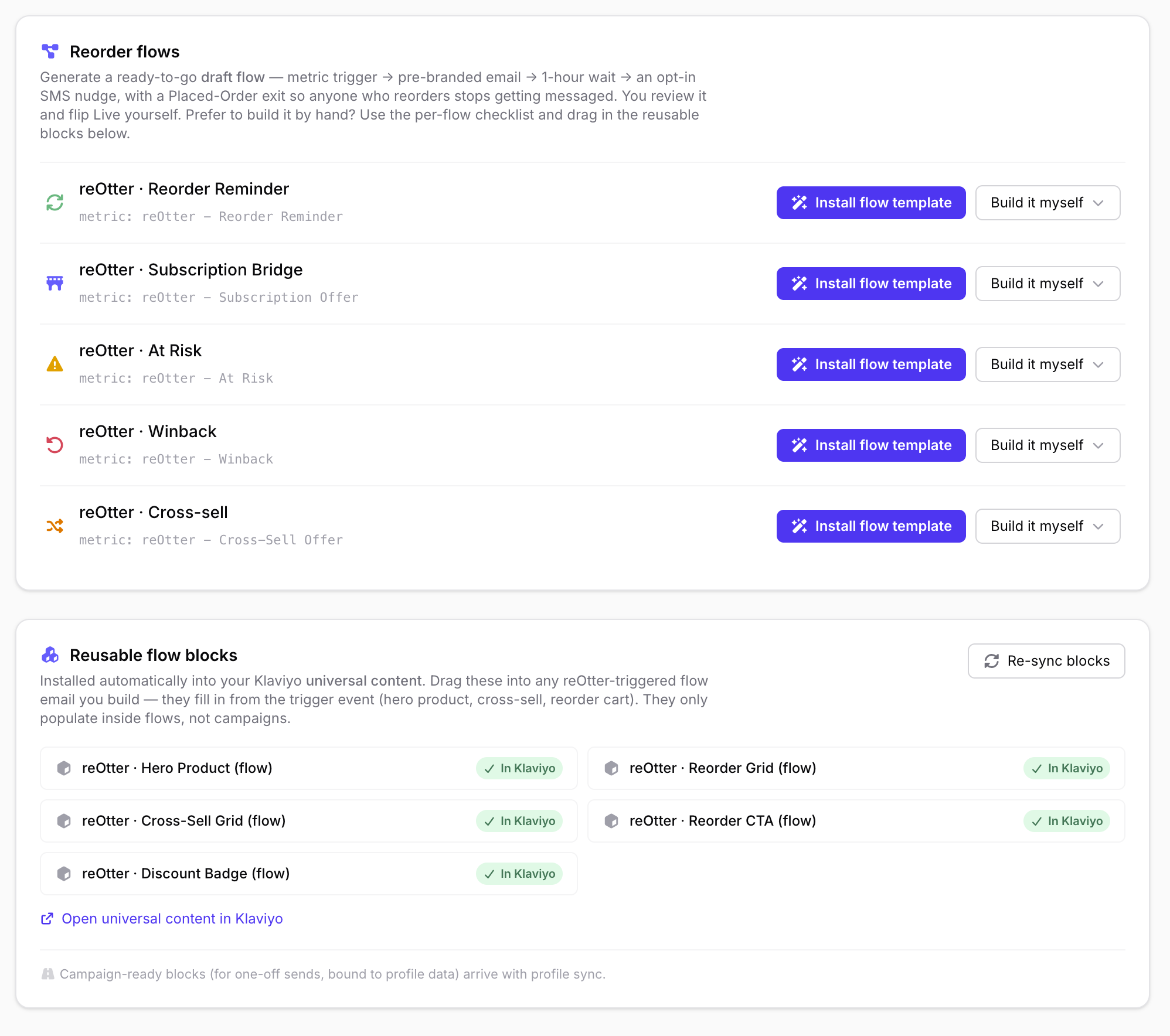
reOtter's Flow Setup page shows each flow with its metric, can install a ready-to-go draft flow per trigger, and installs the reusable flow blocks into your Klaviyo universal content:
The event envelope
Every event carries the same property schema — keys are always present, so conditional splits never hit a missing property:
| Property | What it is |
|---|---|
heroProduct |
the single featured product card for this event |
dueForReorder (+ Count, Ids) |
the customer's due products — mirrors the storefront's "Ready to Reorder" section |
winbackProducts (+ count/ids) |
previously purchased, not currently due |
crossSellProducts (+ count/ids) |
the recommendation rail ("You might also like") |
usualProducts (+ count/ids) |
wholesale digests only: the customer's usual order |
storefrontUrl |
use this for CTAs — the customer's personal, tokenized storefront link; already attributed, never null, never add UTM params |
storefrontShopifyUrl / storefrontHostedUrl |
raw per-surface links for per-flow override |
totalCartPrice |
sum of the card prices |
triggerType |
replenishment_due, at_risk, winback, subscription_bridge, cross_sell |
hasDiscount, bestDiscountLabel/Type/Value/Title/Description |
the hero's resolved discount — branch subject lines on hasDiscount |
freeShipping, freeShippingTitle/Description |
free-shipping offer, separate from the price discount |
isWholesaleDigest, wholesaleBusinessName, wholesaleContactName |
wholesale digest personalization |
The three product arrays mirror the storefront page the CTA opens — the email and the landing page can never disagree about what's due or recommended.
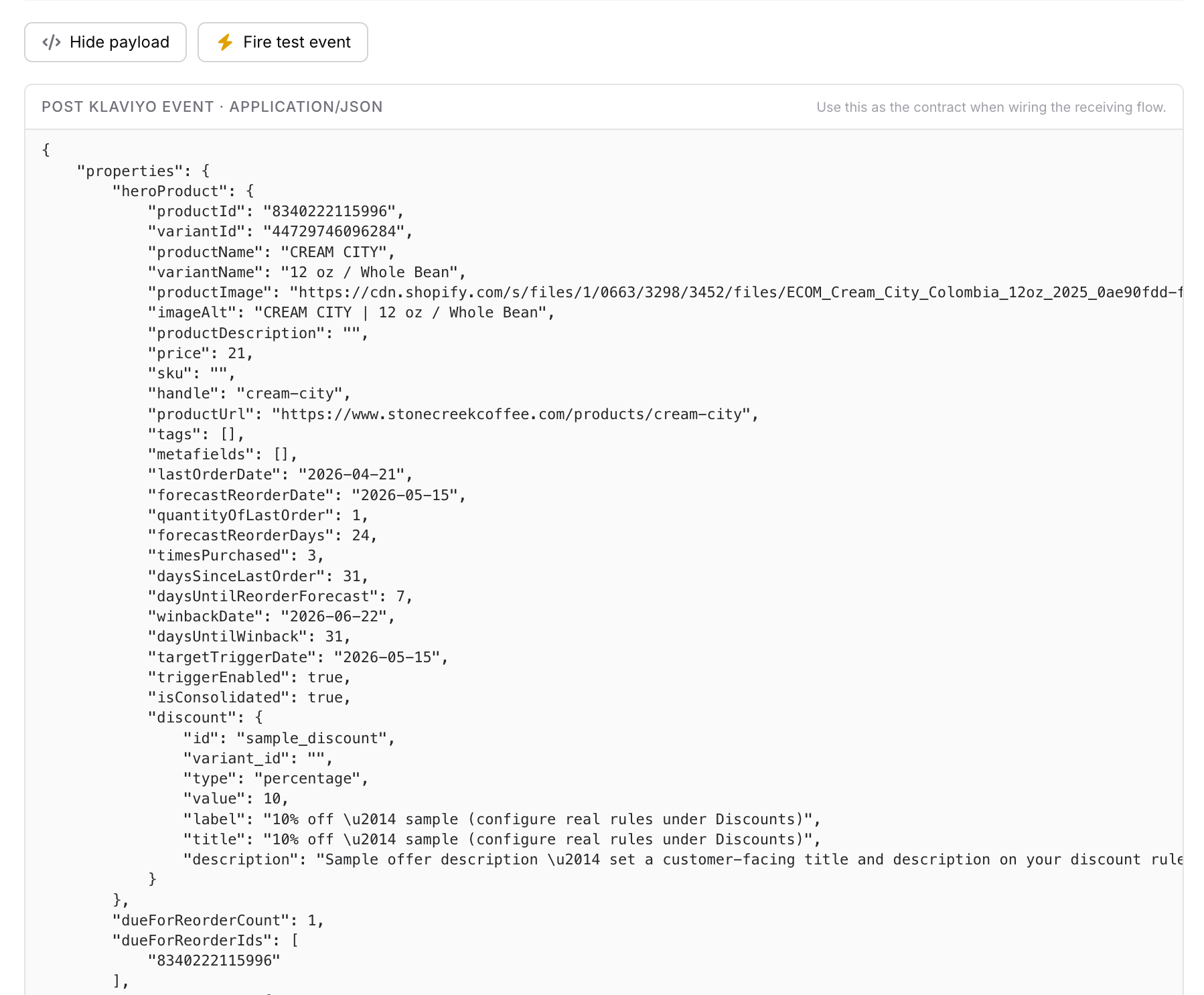
Every trigger has a "View sample payload" panel in reOtter (with a fire-a-test-event button) — use it as the contract when wiring the receiving flow:
Product card shape
Every product entry in heroProduct and the arrays:
{
  "productId": "8791020102",
  "variantId": "4501122334",
  "productName": "Ethiopia Yirgacheffe",
  "variantName": "12oz Whole Bean",
  "productImage": "https://cdn.shopify.com/...",
  "price": "18.00",
  "productUrl": "https://store.com/products/...",
  "handle": "ethiopia-yirgacheffe",
  "sku": "ETH-12-WB",
  "tags": ["single-origin"],
  "lastOrderDate": "2026-07-12",
  "forecastReorderDate": "2026-08-20",
  "daysSinceLastOrder": 38,
  "timesPurchased": 4,
  "discount": { "label": "10% off" }
}
The forecast context (lastOrderDate, forecastReorderDate,
timesPurchased…) lets templates say "you're probably running low — it's
been 38 days" instead of a generic reminder.
Usage patterns
- Template bindings:
{{ event.heroProduct.productName }}, or loop:{% for item in event.dueForReorder %} … {% endfor %} - Conditional splits: on
hasDiscount,dueForReorderCount,triggerType,isWholesaleDigest - CTA: always
{{ event.storefrontUrl }} - Or drag in the prebuilt
reOtter · … (flow)universal-content blocks: Hero Product, Reorder Grid, Cross-Sell Grid, Reorder CTA, Discount Badge, and Reorder + Recommended (flow) — the complete self-guarding section (hero + due products + recommendations + storefront CTA) that mirrors the campaign drop-in but binds the trigger event.
A note on the editor canvas: Klaviyo does not evaluate template tags in the builder, so dynamic images show as broken placeholders and text shows the raw tags — that's a Klaviyo limitation, not missing data. Use Preview & test and select a recent event to see the block fully rendered; in real sends every image/text is guarded, so nothing broken ever reaches a customer.
Recipes
- Discount-aware subject lines: conditional split on
event.hasDiscount→ "Your 10% is waiting" vs the standard subject. - Consolidation-aware layout:
dueForReorderCount > 1→ grid layout; a single product → hero layout. - Wholesale digests: branch on
isWholesaleDigest, greet withwholesaleContactName/wholesaleBusinessName, and renderusualProductsas the order sheet.
Building for campaigns instead? Start with Klaviyo profile properties.